Category
Category Management
It is important that you learn how to manage your store's categories using the administration panel. Before adding a category, you should make sure that you have all the necessary information about the category you will add to the store. The more information you provide about your categories in your store, the more detailed information you will allow your customers to have before purchasing in your store.
Add Category
When adding a product without a product category, the product will not appear under any category on the front end of the store. The product page can only be accessed if the customer types the product name, one of the product labels in the search box, or visits the product via a manufacturer page. If you want this product to be more easily found and accessible by your customers in the store window, we recommend creating the category before adding the product.
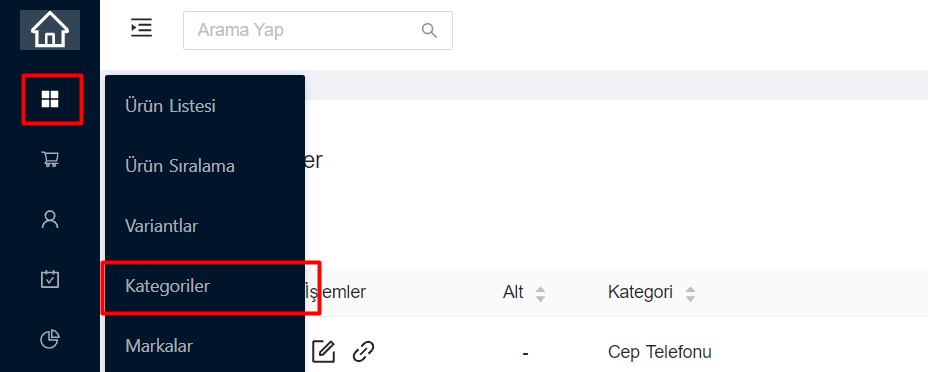
- Log in to the Categories page.
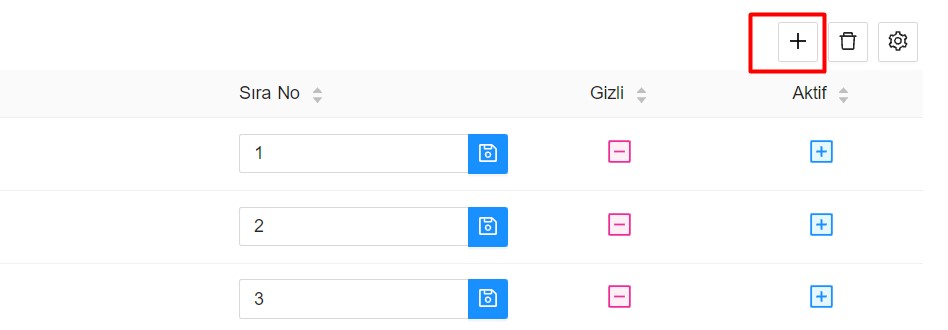
- Add Category You can start adding your category by clicking ( + ).
Category Content Management
| My money | Description |
|---|---|
| Category Name | Enter the category name you want to add. |
| Top Category | If you want to show the category you added in a subcategory, use here. (If left blank, it will add it as Main Category) |
| Thumbnail | Image area that you can use on the category page in your store |
| Big Picture | Image area that you can use on the category page in your store |
| SEO Link | It is created automatically when you add a new category. If you want to use a different link, it can be edited. |
| SEO Title | The category name to be displayed in the browser tag section.Meta Tag Title |
| SEO Description | Category summary to describe the category page to search engines. Meta Tag Description |
| Keywords | Keywords containing the name of your category page. Meta Tag Keywords |
| Category Description | On the category page, text to describe this category. It will be displayed on the front of your store. Description |
| Showing Products | Hides the display of products on the category page. |
| Hidden Category | Hides the category in the store. |
| Sequence No | Allows sorting of added categories. |