Order Settings
This is the main settings screen where you can manage the form details your customers encounter when creating an order on your site, the shipping tax rates, and the discounts for bank transfers.
To reach this page, follow the steps Settings > Commerce > Order Settings from the left menu in your admin panel.
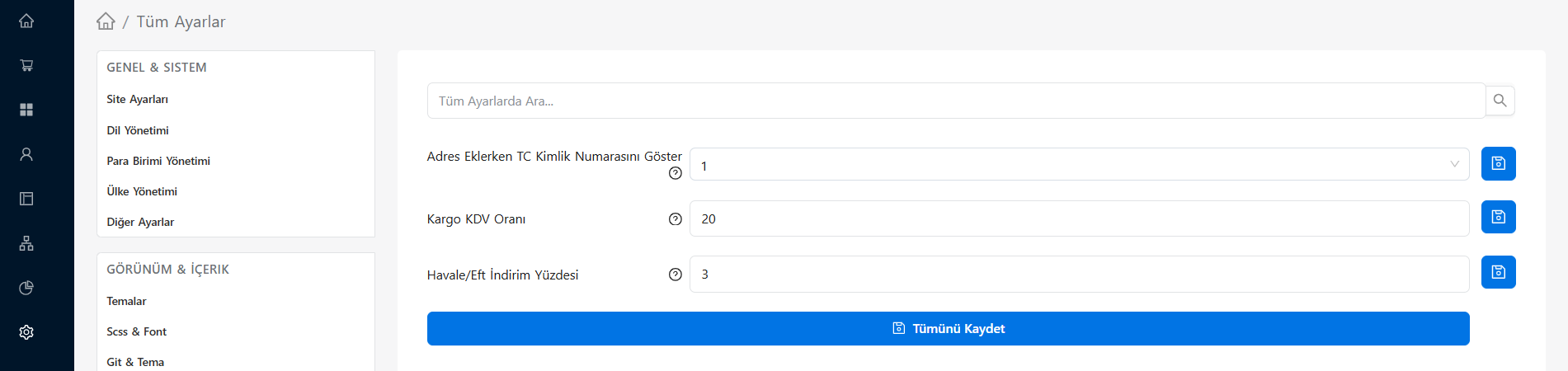 The Order Settings section in the E-Ticaret Shop admin panel
In the table below you can review what the settings on this page mean and how you should use them:
Setting Details
| Setting Title | Description and Usage |
|---|---|
| Show National ID Number When Adding an Address | Determines whether the "National ID Number" input field is shown on the form when your customers create a new address on the checkout page or in their customer profile. |
| Shipping VAT Rate | The field where you enter, as a percentage (e.g. 20), the standard VAT rate to be applied to the shipping fee collected from the customer on your site. |
| Bank Transfer/EFT Discount Percentage | The net cart discount percentage you will apply in order to encourage your customers to pay by bank transfer/EFT instead of by credit card at the payment step (e.g. 3% off the cart total). This way you can save on virtual POS commissions. |
💡 Tip: Due to legal invoicing processes in Türkiye, the customer's national ID information (for individuals) may be required in order to issue an e-archive or e-invoice. You can enable this field according to the requirements of your accounting department or your invoice integration. Do not forget to press the "Save All" button after making changes.