Installment Option
On the Order > Payment & Shipping > Installment Option screen, the matrix of installment numbers and commission rates for different credit card programs (Bonus, Maximum, Axess, etc.) valid in your virtual POS or payment infrastructures is configured.
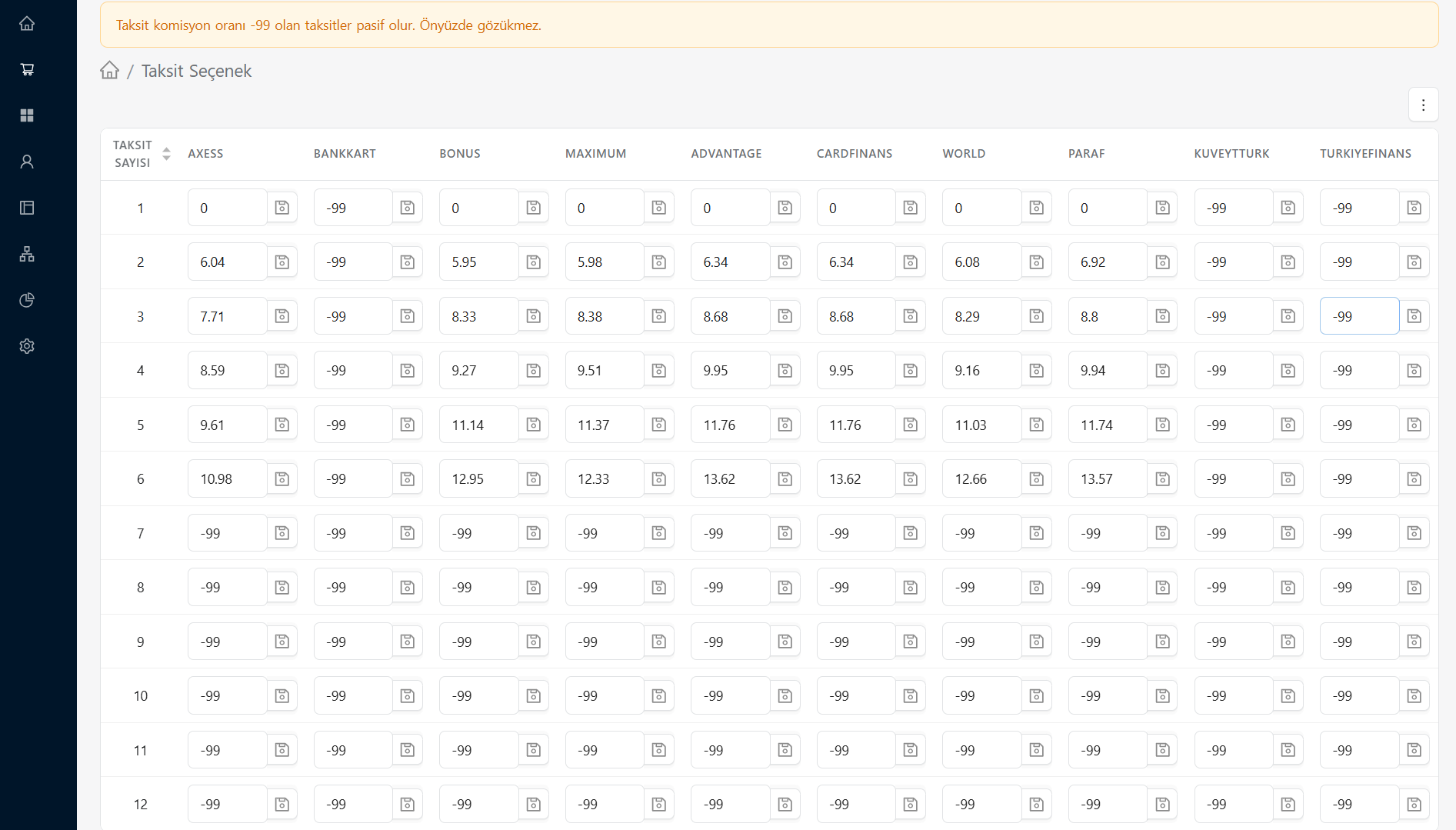
Using the detailed table on the page, you can manage the installment options you offer to your customers with the following rules:
- Number of Installments (Lines): Represents the installment months from 1 (Cash / Single Payment) to 12.
- Card Programs (Columns): AXESS, BANKKART, BONUS, MAXIMUM, WORLD etc. These are columns created based on credit card families.
- Commission Rates (Boxes): It is the percentage of maturity difference (commission) that will be reflected on the relevant card and number of installments. For example; Entering "0" in a field means that you will make installments (zero commission) for the cash price for that card.
- Making Installments Passive (-99 Rule): As stated in the orange warning at the top of the screen, you must write -99 in the box of an installment rate that you do not want to offer to the customer or that is not in your agreement. Options with a commission rate of "-99" will be completely disabled and not visible on the payment page (front-end).
You can instantly save the settings to the system by entering the relevant commission percentage or the number -99 in the box and clicking on the small floppy disk icon next to it.