Shipping List
The Order > Payment & Shipping > Shipping List page manages the shipping alternatives and basic display rules you will offer to your customers for purchases made through your e-commerce site.
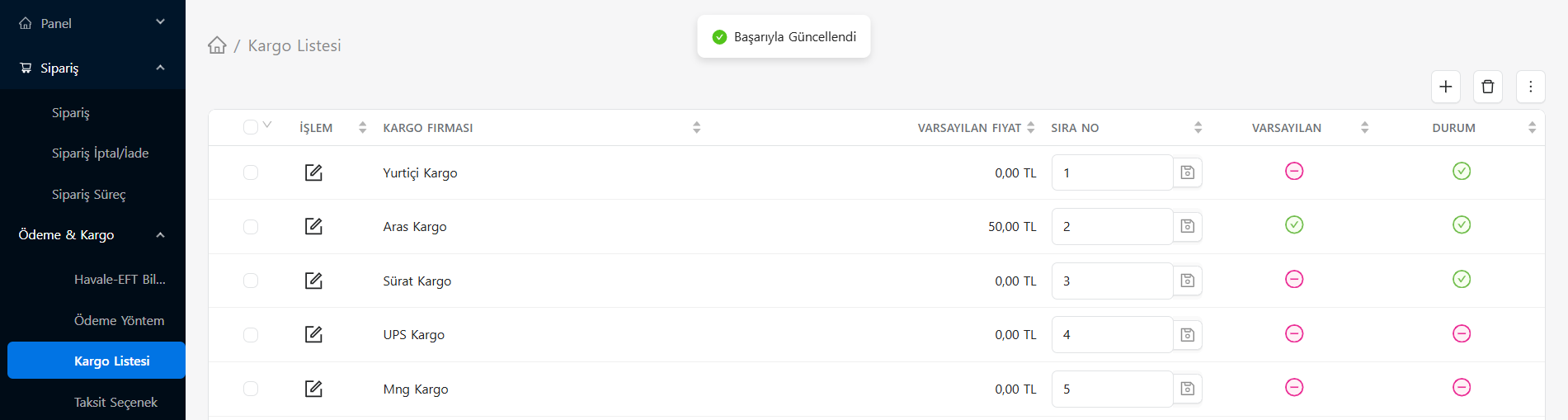
In the table on the page, you can see the cargo companies your company works with in detail and perform quick transactions:
- Cargo Company: This is the name of the shipping company that customers will see in the cart and payment step (Ex: Yurtiçi Kargo, Aras Cargo, etc.).
- Default Price: This is the standard shipping opening fee determined by the company or that you want to reflect. (If you do not have desi-based advanced rules, this base price will apply, 0.00 TL is applied for free shipping as seen in the table).
- Order Number: It determines the order in which the companies you work with will be listed to the customer on the transportation screen. You can save the changes without refreshing the page by typing the number in the box and clicking on the icon next to it.
- Default: This indicates which cargo company will be automatically selected first on the form when the payment screen opens. Only one (Green Tick) can be the default.
- Status: This is the control that allows you to keep the cargo company inactive (pink minus) or if active (green check) instead of deleting it completely when the integration or shipping agreement ends.
Note: You can add a new cargo model/company to the system by using the (+) button at the top right of the list.